
Binance 2FA Security: Whitelist, Anti-Phishing, and Passkeys
Set up the account protections that matter before keeping crypto on an exchange or enabling advanced products.
Updated: May 13, 2026 | Reviewed by the Ubneo editorial team
This guide was refreshed against current fee tables, help-center materials, product flows, and risk checks relevant at publication time. For regional limits, policy changes, or product availability, confirm the latest official documentation before acting. Editorial standards | About Ubneo | Contact
Quick answer: what security settings should you enable first?
Start with an authenticator app, then add an anti-phishing code and withdrawal whitelist. SMS alone is weaker because phone numbers can be targeted through SIM-swap attacks.
- Must enable: app-based 2FA, backup key storage, anti-phishing code, and withdrawal whitelist.
- Best upgrade: passkeys or a hardware security key for logins and high-value accounts.
- Before depositing: confirm the URL, test small withdrawals, and keep long-term holdings in self-custody when appropriate.
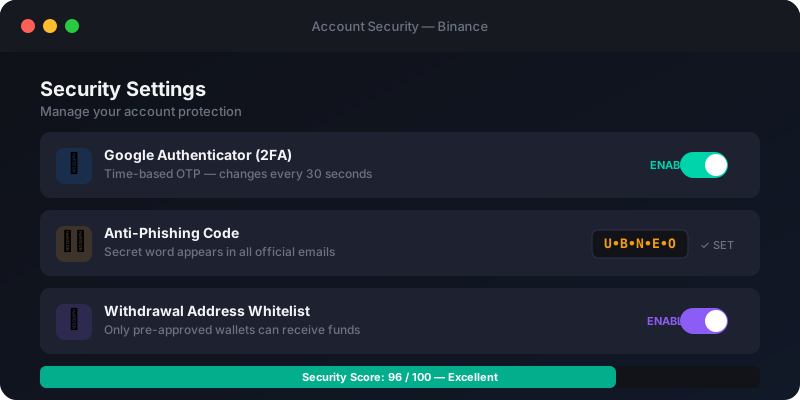
In the cryptocurrency world, you are your own bank. If a hacker gains access to your Binance account and withdraws your funds, there is no customer service hotline that can reverse the blockchain transaction. The funds are gone forever.
Fortunately, Binance provides enterprise-grade security tools. You just need to turn them on. Here are the three mandatory steps to secure your account.
1. Enable Authenticator App (2FA)
Two-Factor Authentication (2FA) is the most critical security layer. It requires a hacker to not only know your password but also have physical possession of your smartphone.
🛑 Why SMS 2FA is Dangerous
Do not rely solely on SMS text messages for 2FA. Hackers frequently use "SIM Swapping" attacks, where they trick your telecom provider into transferring your phone number to their SIM card. Once they have your number, they intercept your SMS codes.
The Solution: Use an Authenticator App like Google Authenticator or Authy.
- Go to Dashboard > Security > Authenticator App.
- Download Google Authenticator on your phone.
- Scan the QR code provided by Binance.
- CRITICAL: Write down the 16-digit backup key on a piece of physical paper and store it safely. If you lose your phone, this key is the only way to recover your 2FA access without a lengthy manual review process.
2. Set an Anti-Phishing Code
Phishing is the #1 way crypto users lose their funds. Hackers send fake emails that look exactly like official Binance communications, tricking you into clicking a malicious link and entering your login credentials.
An Anti-Phishing Code is a unique word or phrase that you set up in your Binance security settings. Once enabled, Binance will include this exact phrase in every legitimate email they send you.
- If you receive an email claiming to be from Binance, but it lacks your secret code, it is a scam. Delete it immediately.
- To set it up: Go to Security > Advanced Security > Anti-Phishing Code.
3. Enable Withdrawal Whitelist
This is your ultimate fail-safe. The Withdrawal Whitelist feature ensures that crypto can only be withdrawn to wallet addresses that you have pre-approved.
If a hacker somehow bypasses your password and 2FA, they will try to withdraw your Bitcoin to their own wallet. If the Whitelist is active, they cannot do this. Adding a new address to the whitelist requires email verification and 2FA, and often triggers a 24-hour cooling-off period before withdrawals to the new address are permitted.
To enable: Go to Security > Advanced Security > Withdrawal Whitelist.
Bonus: Passkeys (YubiKey)
For the highest level of security, consider purchasing a hardware security key like a YubiKey. This physical USB device must be plugged into your computer or tapped on your phone to authorize logins and withdrawals. It is virtually impervious to remote hacking and phishing.